
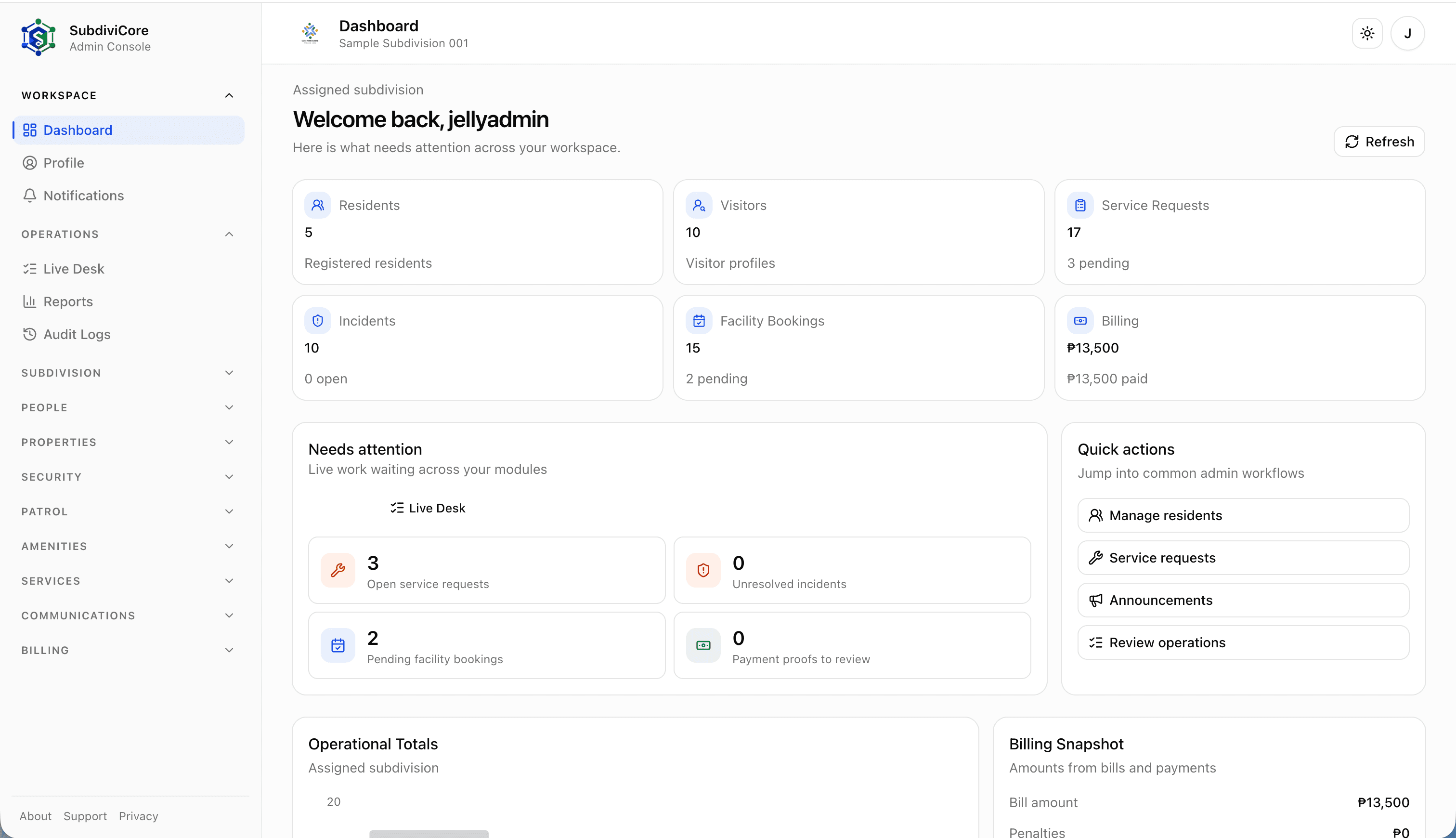
Operations desk
Admin Web App
A full-width command center for residents, visitors, billing, service requests, incidents, facilities, and daily admin work.
A digital operating system for subdivision offices, residents, and field teams. Keep dues, requests, work orders, facilities, gate activity, notices, and patrol work moving in one coordinated platform.
SubdiviCore presents the system as a whole: back-office control, resident self-service, security operations, and service execution that share the same community context.
Manage residents, properties, household members, dues, announcements, documents, facilities, requests, and approvals from one web dashboard.
Residents can view home records, submit service requests, upload payment proofs, book facilities, receive notices, and use gate QR workflows.
Guard teams can verify passes, record gate activity, handle visitor logs, follow patrol routes, and keep operational handovers moving.
Maintenance staff and service providers can review assigned work orders, update progress, record materials, and submit close-out notes.
Announcements, notifications, status updates, and workflow changes keep offices, residents, guards, and service teams aligned without manual follow-ups.
Track dues, fees, payment proofs, receipts, and subdivision-level finance workflows with clear visibility for every household.
Different experiences for admins, residents, household users, guards, maintenance staff, and service providers keep sensitive data scoped to the right people.
Each role gets a focused interface while the subdivision keeps one shared operational view.
SubdiviCore is easiest to evaluate when each stakeholder can see where they fit: board-level decisions, office work, gate operations, service execution, and resident self-service.
See the operating scope clearly before approving rollout, budget, policies, and priority modules.
Keep resident records, billing follow-through, requests, documents, and daily approvals easier to track.
Verify residents and visitors faster while preserving gate logs, incidents, patrols, and handover context.
Work from assigned queues, update progress in the field, and close out tasks with clearer notes.
Use one resident app for notices, payment proofs, facilities, service concerns, and gate workflows.
SubdiviCore connects the admin web console, resident mobile app, security mobile app, and service mobile app around the same subdivision operations.
Operations desk
A full-width command center for residents, visitors, billing, service requests, incidents, facilities, and daily admin work.
Resident self-service
Mobile screens for resident-facing dues, payment progress, service requests, and everyday community workflows.


Guard operations
Field screens for visitor checks, resident gate logs, backend-guarded records, and guard-side verification work.


Field execution
A focused mobile workflow for maintenance staff and service providers to review assigned work orders, update progress, and submit close-out details.


Start with admin-only operations, add resident self-service, bring in guard workflows, or roll out the full admin, resident, security, and service provider suite.
Best for small subdivisions
A focused admin launch for HOAs that are still transitioning from manual records and paper-based coordination.
Recommended package
The practical everyday package for subdivisions that want office control plus resident self-service.
For gated subdivisions
A complete digital community setup for HOAs that need resident workflows and guard-side security operations.
Flagship offering
The full operating suite for larger communities with active maintenance teams, contractors, and service execution needs.
Setup fee reflects onboarding, configuration, deployment, training, and implementation effort.
| Households | Essential | Community | Secure | Enterprise |
|---|---|---|---|---|
| Up to 100 | ₱50,000 | ₱75,000 | ₱90,000 | ₱110,000 |
| 101-300 | ₱70,000 | ₱100,000 | ₱120,000 | ₱145,000 |
| 301-600 | ₱90,000 | ₱130,000 | ₱155,000 | ₱185,000 |
| 601-1,000 | ₱120,000 | ₱170,000 | ₱200,000 | ₱240,000 |
Monthly subscription depends on household range and selected package scope.
| Households | Essential | Community | Secure | Enterprise |
|---|---|---|---|---|
| Up to 100 | ₱4,500 | ₱6,500 | ₱8,500 | ₱10,500 |
| 101-300 | ₱6,000 | ₱8,500 | ₱11,000 | ₱13,500 |
| 301-600 | ₱8,000 | ₱11,000 | ₱14,500 | ₱18,000 |
| 601-1,000 | ₱10,500 | ₱14,500 | ₱19,000 | ₱24,000 |
Add-ons can be scoped per subdivision after the core package is selected.
₱2,500-₱5,000/month
Available for subdivisions that want AI-assisted admin workflows. Final pricing depends on configured scope and rollout needs.
Powered by Resend
For subdivisions that want reliable transactional email notifications for resident, visitor, billing, facility, and account workflows.
| Plan | Emails / Month | Price |
|---|---|---|
| Starter | Up to 5,000 | ₱500/month |
| Standard | Up to 15,000 | ₱1,200/month |
| Professional | Up to 30,000 | ₱2,000/month |
| Enterprise | Custom | Contact Sales |
Powered by Semaphore
For subdivisions that need SMS alerts and verification messages for urgent, account, billing, visitor, facility, and gate workflows.
| Plan | SMS Credits | Price |
|---|---|---|
| Starter | 500 SMS | ₱600/month |
| Standard | 1,000 SMS | ₱1,100/month |
| Professional | 2,500 SMS | ₱2,500/month |
| Enterprise | Custom | Contact Sales |
Rollout starts with the records, policies, users, and modules your subdivision already depends on, then expands in phases once the first operating habits are stable.
Start with resident, property, household, vehicle, billing, facility, staff, and document records from the current office process.
Translate HOA rules for dues, approvals, facility use, gate access, visitors, patrols, and service requests into launch-ready workflows.
Prepare admin, resident, household, guard, maintenance, and service-provider access around approved roles and subdivision scope.
Begin with priority modules and selected users, then widen rollout as records, training, and community habits settle.
SubdiviCore onboarding is shaped around the subdivision's current records, policies, staff roles, and priority workflows.
Step 1
Map current resident records, billing rules, gate workflows, facilities, staff roles, and documents before configuration starts.
Step 2
Set up the admin console, resident app, security app, and service app around the modules your subdivision wants to launch first.
Step 3
Review access, train office users, guards, and service teams, and run a focused pilot with selected residents before wider rollout.
Step 4
Go live with a clear operating scope, then adjust workflows as real residents, guards, service users, and admin teams start using the platform.
SubdiviCore handles sensitive community workflows, so the public site should make the operating boundaries clear before the first walkthrough.
Admins, residents, household users, guards, and service teams see the tools and records that match their approved responsibility.
Community data is organized around each subdivision so client records, teams, and residents stay separated by operating scope.
Gate logs, service updates, billing follow-through, incidents, documents, and approvals can be reviewed with clearer operational context.
Payment gateway setup, integrations, notification usage, and custom automation can be confirmed separately during scope planning.
Share your preferred package, subdivision size, current priorities, and the workflows you want to improve. The first conversation can focus on the launch scope that fits your community.